ASSETFORGE
AI generator
Forge assets.
Ship your game.
Set your art style once, then describe assets in chat. AssetForge generates them all in one consistent style — optimized for production and ready to drop straight into Unity.
Style Plate
muted palette, top-down…
Instructions
32×32 sprites · transparent bg · 16 colors max
Style applied to every generation in this project.
forge a health potion with blue glow effect
// style: 16-bit pixel art, muted palette, top-down · 2.4s
↳ potion-glow-001.png
make the first one darker and more saturated
striking
The problem
AI art generators don't know what game you're making.
Ask a generic image model for a sprite and you get a one-off illustration — a different palette, a different proportion, a different render every time you ask. Getting that into a real Unity project still means re-describing your art style on every prompt, then resizing, re-cropping, and hand-building animation state machines.
Style drifts
every generation is its own interpretation — nothing matches the last one.
Output isn't engine-ready
wrong canvas size, no alpha, no sprite-sheet slicing.
Unity setup stays manual
clips, Animator Controllers, and prefabs still get wired by hand.
Why AssetForge
One project, one style
AssetForge is style-aware. Every asset in a project shares the same palette, proportions, and render — so your sprites, icons, and tiles look like one game, not a stock-asset grab bag.
Production-ready output
Not concept art — usable art. Clean transparent alpha, consistent dimensions, and centered framing mean every asset is built to ship in a real game, straight out of the forge.
Built to drop into Unity
Export any asset as a full Unity import bundle — sprite, .anim, .controller, .prefab — zipped together. Pull it into your project and it's in your scene, animated, no cleanup.
Real outputs
One project. One consistent style.
Four characters from the same dungeon-crawler project — same Style Plate, same palette, same render. Hero, enemy, caster, and NPC, all reading as one game.
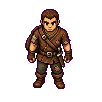
Bram · wandering scavenger
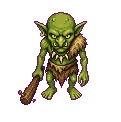
Skrit · goblin raider
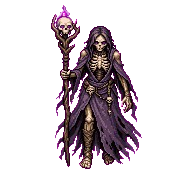
Vessa · bone conjurer
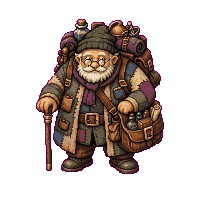
Old Corwin · traveling merchant
How it works, in detail
Style-aware generation
Set the look once. Every asset inherits it.
How it works
- Your Style Plate and Environment notes are saved per project, not per prompt.
- Every request is forged as Style + Instructions + your message — so the AI sees your full art direction on every single generation.
- Projects are isolated: a pixel-art roguelike and a painterly platformer never bleed into each other.
What it saves you
Stop re-typing '16-bit, muted palette, top-down' a hundred times. Assets made weeks apart still match — the visual cohesion that normally needs a dedicated artist or a strict style guide, handled for you.
16-bit pixel art, muted earth tones, top-down view
Applied to all 12 assets in this project automatically.
Production-optimized output
Usable art, not concept art.
How it works
- Assets render on real transparent alpha at consistent square dimensions — centered, trimmed, no background to knock out.
- Every asset keeps its prompt and edit lineage, so you can reforge or image-edit ('make the glow blue') without ever losing the original.
- Each request generates one production-ready image — edit or reforge it instead of hunting through variations.
What it saves you
Skip the Photoshop busywork — no cropping, background removal, or resizing. Iterate in seconds and never lose a version you liked.
Edit this image
Original preserved · full edit history tracked
Unity-ready export
From forge to scene in minutes.
How it works
- One export produces the full bundle — sprite, .anim, .controller, .prefab, and matching .meta files — not just a PNG.
- Drop the .zip into your project's Assets folder and Unity imports every piece already wired together.
- Consistent sizing means predictable pixels-per-unit and no per-asset import fiddling.
What it saves you
No format conversion, no manual import tweaking, no animation graph to wire by hand.
potion-glow-001.png
1024 × 1024 · transparent alpha
Unity project · Assets/
├── Scripts/
├── Scenes/
├── Sprites/
│ ├── potion-glow-001.png
│ ├── potion-glow-001.anim
│ ├── potion-glow-001.controller
│ └── potion-glow-001.prefab
Prefab, sprite, and Animator already wired · no config needed
From style to Unity scene
Style Plate
Set art direction once per project — pixel, painterly, vector. Every asset forged after this inherits it.
Chat
Describe an asset in plain language. No need to re-describe the style — it travels with every request.
Pipeline
The server prepares your request using your project's style, previous assets, and references, then generates.
Export
One .zip drops straight into Assets/ — .png, .anim, .controller, .prefab, and their .meta files, already wired together.
Character pipeline
- 01Neutral pose
- 02Directional turnaround
- 03Animation frames
- 04Sprite sheet
- 05.anim + .controller
Who this is for
Solo devs
Building a 2D Unity game without a dedicated artist. Need a consistent look across dozens of sprites without hiring one.
Small studios
Two or three people where the programmer is also doing art direction. Need assets that don't need a full re-pass later.
Prototypers
Validating a game idea fast. Need art that looks like a real game, not a slide deck, without weeks of asset production.
Unity asset pipeline
What AssetForge generates
Every shipped output maps directly to Unity's asset pipeline. From a single text prompt you can generate a sprite, its animation, and a working prefab — bundled as a single .zip ready to drop into Assets/.
Sprites & visual assets
The base layer of every 2D project. Generated already sized, centered, and alpha-correct — characters, objects, and UI elements without a Photoshop pass.
Animation system
Full animation graphs, not just frames. Clips and Animator Controller states wired together — from sprite sheet to working Animator in one generation.
Prefabs
A fully assembled Unity GameObject — sprite, animation, and Animator already set up. Drag it into your scene and it works.
Unity import bundle
Every file above, zipped with the correct folder structure and .meta files. Drop it into Assets/ and Unity does the rest. Not yet a native .unitypackage — see roadmap.
Materials
Rendering behavior defined alongside the asset. Shaders, blend modes, and properties set to match the generated visual — Unity does not have to guess.
Tilemap system
The complete tilemap stack — tileset image, individual tile definitions, and Tile Palette configuration. Open the Tile Palette window and start painting immediately.
Scenes
Optional level output. Objects placed, tilemaps painted, and hierarchy structured — a generated scene as a starting point rather than a blank one.
Scriptable objects
Game data, not just art. Enemy stats, item definitions, dialogue entries, and configuration — generated as Unity Scriptable Objects ready for your existing systems.
Roadmap
Shipped vs. planned
Shipped
- Style-consistent sprite generation, project-aware recall
- Sprite-sheet animation → .anim clips
- Animator Controller generation
- Prefab generation
- Texture meta / grid slicing
- Unity import bundle as a .zip
- Character turnaround + animation pipeline
- Video-derived animation pipeline
Planned
- Native .unitypackage export (today's bundle is a plain .zip)
- Materials (.mat)
- Tilemap system (.tile / .palette)
- Unity scene output (.unity)
- Scriptable Object generation
- Team members / shared project libraries
Pricing
Simple pricing, built for solo devs.
Start free. Upgrade when you're shipping for real — no seat minimums, no annual lock-in.
Free
Try the forge
- 10 generations / month
- 1 project · 1 Style Plate
- PNG export
- Community support
Pro
For shipping games
- Unlimited generations
- Unlimited projects & Style Plates
- Full Unity export bundle (.anim, .controller, .prefab)
- Priority generation queue
Ready?